Categories
Conferences and event reports

Culture + heritage + digital at Web Directions South 2011

Sebastian Chan and Luke Dearnley

Luke Dearnley and I were last minute additions to the Web Directions South lineup last week. Coaxed by Maxine Sherrin to do a ‘fireside chat’ we sat comfortably by a digital fire and talked broadly around some of the exciting projects that are happening in the digital heritage space right now.

We tried to cover a lot of ground and tease out some of the issues in the sector as libraries and museums around the world finally begin to build significant momentum around digital content. Taking these discussions to the web developer community is important because all this is happening at a time when the government is calling for discussion of the National Cultural Policy where there is talk about ’emerging technologies’ and the NBN in the ‘arts’. (See the Ideascale on the digital culture response to the NCP.)

Here’s a brief rundown of what we covered in our free-wheeling talk done without notes (and, sadly, much sleep).

I started out looking at where we were at the Powerhouse in 2001. Back then we were talking about the ‘virtual museum’ and exploring 3D tours and building monolithic encyclopaedic resources using our ‘authority’. Whilst there was some amazing stuff built back then, that won awards (and we still get enquiries about), the web has changed.
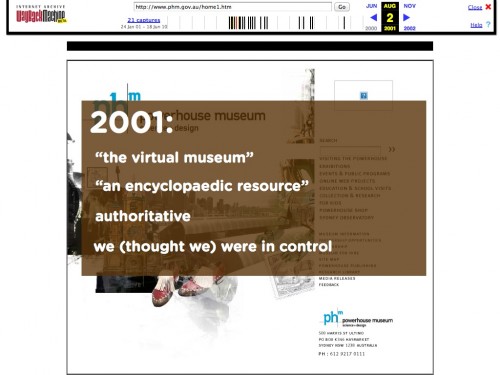
And now where we are in our thinking in 2011.
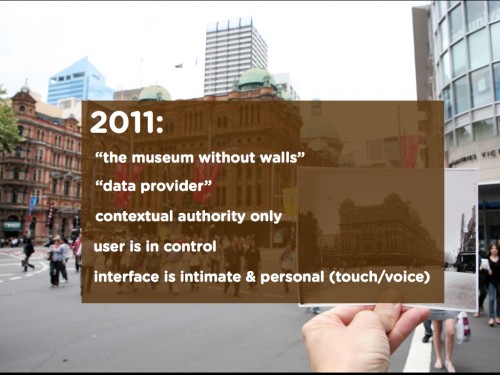
Now it is all about being a data provider, getting the our knowledge and collections out into the community where they can be debated and gather feedback and attract interest. The social web and now the mobile web has made this possible at the kind of scale that wasn’t possible in 2001. At the same we now have ‘contextual authority’ rather than what we previously imagined was ‘overall authority’. Remember that in 2001 Wikipedia was only just starting and had only 6,000 articles.

At the same time the user is firmly in control not only of how they navigate ever growing competing information sources, they also are using interfaces that fundamentally change how they perceive their computing devices. Touch and now voice interfaces, radically personalise, even anthropomorphise our devices. They are carried closer to us than ever before, creating a sense of intimacy and helping us form (unhealthy?) relationships with our mobile technologies. (“Excuse me while I just check my iPhone one more time – I haven’t touched it in the last five minutes.”)
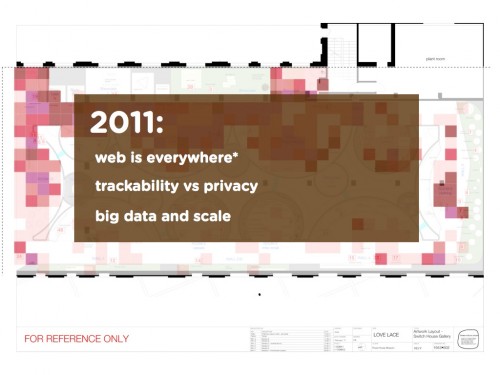
In the background of this slide you can see an early heat map that is produced by tracking the dwell time of visitors carrying wifi devices in one of our exhibitions (they don’t even need to be connected to our wifi to be picked up). I’ll be blogging about that shortly in a new post but for now it should serve as a reminder that this sense of personal connectivity comes at a high price of personal trackability. It isn’t simply bundled up under ‘privacy’ and there’s a long way to go in the public discussions and debate about the trade off between utility and privacy.

The other big change is that of scale.

A collection like that of the Powerhouse used to feel ‘large’ but in actual fact it is tiny. It’s value in the digital space now is no longer as an island but only in what it can contribute to national and international collections – a collection of collections. That’s a tough challenge for a State-funded museum whose majority of ‘visitors’ walking in the door live in Sydney.

But at scale new possibilities emerge.

At this point we started to look at some of the initiatives that are exciting us around the world at the moment. Initiatives where the ‘value’ wasn’t necessarily obvious at the beginning but emerged only after time.

We showed and talked about ->

– Tim Sheratt’s work with the digitised newspaper collections in Trove and the emergent stories he is starting to knit together by analysing the changes in language in newspaper articles over time, or by facial recognition in archival collections. These stories are only possible at scale – and even now they are terribly incomplete with uneven digitisation of each State’s newspapers in Trove – but they are getting better over time. Everyone (even you, dear reader) needs to go an read the transcript of Tim’s recent keynote at ANZSI. We are at the very very beginning of this but Tim’s work hints at some of the possibilities.

– New York Public Library’s historical menus project and how marking these menus up in the way they have lets us observe the changes in diet and ingredients, as well as food prices over time. And how, of course, dining at the Possum Club in 1900 would have been quite an experience.

– The other thing about the NYPL menus project is the way that, prior to releasing an API, they’ve done what we did at Powerhouse. They’ve released the whole data set as a ZIP. As we found with our own collection, a downloadable full dataset allows people to do mass scale analysis more quickly and easily (and with less drain on your server) than using an API.

– Looking at scale we briefly showed the free ImagePlot toolkit from the Software Studies Institute at UC San Diego, and how it by allowing you to do image analysis of enormous corpora of image files new patterns and relationships can be discovered.

– Luke talked about linked data and how connecting everything up is slowly becoming possible as more things and thesauri go online. We showed a couple of nice front-end examples of some of the possibilities when collections get connected up. Our very own infant site – the Australian Dress Register – which is slowly growing and bringing on new contributors; and the newly re-designed and re-configured Design and Art Australia Online (formerly Dictionary of Australian Artists Online). Here’s a biographical entry for one of the designers with lots of objects in the Powerhouse collection. Here it becomes possible to traverse her ‘associates’ as well as all the exhibitions etc she has been involved in all over the world.

– We looked at some other exciting community transcription projects that are overcoming difficult issues of both relevance and specialised content. We showed the fantastic Old Weather project with the Citizen Science Alliance using old ship logs from the National Maritime Museum to gather geolocated climate data form the past. It is one of our personal favourites and Fiona Romeo at the NMM published a great paper on it at Museums and the Web earlier in 2011 which you should read. What we find really lovely about this project is that it finds deep value in the kind of collection that museums find very difficult to ‘exhibit’. Actual ships – easy and attractive to put in an exhibition but the ship logs – much harder.

– We also showed the interface for another Citizen Science Alliance project called Ancient Lives. This project is getting citizens to help transcribe papyrus scrolls from the Oxyrhynchus collection whose story of acquisition and discovery is enough to encourage you to give it a go.

In wrapping up we started to ask a number of questions that remain unanswered/unanswerable:

– what the barriers to a Europeana-like project are in Australia, let alone a Digital NZ? Are they more cultural reasons than anything else? What is of ‘national significance’ that we can all agree upon? Is such agreement even possible in a fragmented nation?

– does the ‘open’ in linked open data matter more than just linked data in the short term?

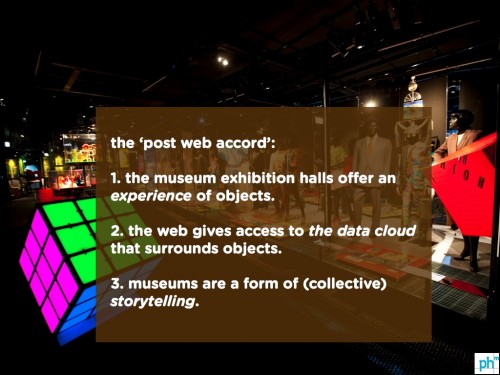
– are libraries able to knuckle down and focus on digitisation better than museums because they aren’t expected to ‘also do exhibitions’? This looped back to an early slide where we talked about the ‘post-web accord’ that emerged in the mid 00s. Is this accord coming under pressure as a result of changing economic circumstances? Or is this just one of the many museum challenges that are under discussion in the sector.
Categories
Collection databases Interviews User behaviour

“Do curators dream of electric collection records?” Exploring how the Powerhouse online collection is used

As one of the first of a ‘new style’ of museum online collections, launching several internet generations ago in 2006, the Powerhouse Museum’s collection database has been undergoing a rethink in recent times. Five years is a very long time on the web and not only has the landscape of online museum collections radically changed, but so to has the way researchers, including curators, use these online collections as part of their own research practices.

Digging through five years of data has revealed a number of key patterns in usage, which when combined with user research paints a very different picture of the value and usefulness of online collections. Susan Cairns, a doctoral candidate at the University of Newcastle, has been working with us to trawl through oodles of data, and interviewing users to help us think about how the next iteration of an online museum collection might need to look like.

I asked Susan a number of questions about what she’s been discovering.

F&N – You’ve been looking over the last few years of data for the Powerhouse’s collection database. Can you tell me about the different types of users you’ve identified?

Based on the Google Analytics, there seem to be four main types of OPAC users. I’ve given each of them a nickname, in order to better identify them.

The first group is the FAMILIARS, composed of people who access the OPAC intentionally. FAMILIARS know of the collection through either experience (having used the online collection previously, or from visiting the museum), or via reputation (ie GLAM professionals, researchers or amateur collectors). FAMILIARS come to OPAC with the highest level of expectations and have the most invested in the experience. Trust and authority are hugely important for the people in this segment.

The second group, I’ve called the SEEKERS. Like FAMILIARS, SEEKERS are driven by a desire for information they can trust. However, unlike FAMILIARS, SEEKERS do not yet know about the museum and/or its collection. This group includes people who are new to collecting communities, or student researchers etc. If they find what they are looking for on the OPAC, SEEKERS have the potential to become FAMILIARS.

The final group for whom authority and trust in information is important are the UTILISERS. These visitors, primarily education users (like school students), have specific and particular research needs, which are externally defined (ie they might be looking for answers to set questions). This group is task-oriented.

The last group that comes to the OPAC is the WANDERERS. These are casual browsers who seek fast and convenient information, but don’t necessarily need depth in their answers. Seb once nicknamed them “pub trivia” users, and that seems pretty apt.


F&N – What sort of proportions do each of these make up?


By far the greatest number of OPAC visitors are WANDERERS. More than 80% of all OPAC users – whether in a two-year period, or a six-month timeframe – visited the collection online once. Obviously not all of these will be WANDERERS, but a significant proportion of OPAC users are clearly coming to meet short-term information needs.

At the opposite end of the scale, around 5% of OPAC users visited the collection five times or more during the last six months. These visitors have the most invested in the current OPAC, having spent time learning to negotiate it.


F&N – Have these users changed over time? (As other collections have come online etc)


The actual make up over time doesn’t seem to have changed that much, although the numbers of visitors dropped a little after a peak in early 2010.

Having said that, there are seasonal trends in the users. The search terms that UTILISERS often use to find the collections (such as “gold license”) are more popular during the school year than at other times. Similarly search terms go through peaks, depending on media interest, such as a high number of searchers who come to the OPAC looking for Australian media personality Claudia Chan Shaw, whose dress is in the collection.

Some search terms are just weird. One of the most popular search terms ever was “blue fur felt” which skyrocketed to popularity in January – July 2010, but has not been used to bring visitors to the OPAC since.

F&N – Are overseas users different from Australian ones?


During the last six months, the OPAC actually had more international users than domestic ones, with the top ten international countries visitors coming from the USA, UK, Canada, New Zealand, India, Germany, France, Netherlands and Philippines. The search terms that lead international users to the OPAC are very different from those within Australia. After all, many of the most searched for items are that link up with the school curriculum, and that is very Australia-specific. These items also make up a significant proportion of the most-looked-at references.

The search terms overseas users to access the collection are often far more specific – such as particular clock brands etc, which would indicate a higher proportion of amateur collectors (SEEKERS and FAMILIARS) than WANDERERS.

Australian users spend longer on the site, and have a far lower bounce rate, so once on site they engage more.

F&N- You’ve been speaking to our curators about how they use ours and others collection databases. What are some of the things you’ve learned from this?

Talking to the curators has been absolutely fascinating. Every single curator that I have spoken to has his or her own ways of researching and gathering collection information. Some curators rely heavily on books, while others spend a significant amount of time conducting face-to-face interviews. Others use websites like Trove, or conduct community consultation online, using wikis and blogs. However, every researcher utilises Google and the Web in some way in their search for information.

No matter how a curator conducts collection research however, all are looking for two main types of information. The first is the broad contextual information for an object that places it into an historical and social framing. This includes the broader history or biography of the creator or manufacturer, and information on the social period in which it is or was used.

The second type of information is specific to the object itself, and includes information about maker’s marks, the object’s history (including provenance, such as how, when and why it came into the collection, why it was owned and used), and any stories that relate specifically to the object.

In order to find this information however, very few of our curators use museum collection databases – even those curators who conduct a significant amount of their research online. The reasons for this varied, but emerging themes included a difficulty navigating online collections (once it could be located on the institution website in the first place), a sense of frustration at being unable to find relevant information/objects, and most important, a lack of trust in online collection databases.

Not one curator that I spoke to trusted either our own OPAC or other online collections as a resource that could provide complete and authoritative information. Where a number of curators did find online collections useful however, was in providing immediate access to images of objects and to get a sense of whether another institution held objects that might be important to their own search. Knowledge about what was in a collection was useful, but not necessarily the collection knowledge that was included in the online record.

A number of curators did use our own OPAC to see what information was being communicated to the public, and to answer public enquiries. However, it was very clear that there are ongoing issues with trust and authority.

Two things that did increase trust for curators however were good quality images (through which they could get a visual sense of the object), and PDFs of original documents. Curators trust that which they can see themselves. For most curators, their expertise is such that they will have an intuitive sense when information they come across is likely to be correct.

—

Following Susan’s initial work we started looking at the SEEKERS in more detail. Why were they coming to the site? And, more importantly, were they satisfied with what they found?

We’ve had a pop up survey running for the last two months – again using Kiss Insights – and the numbers have started coming in.

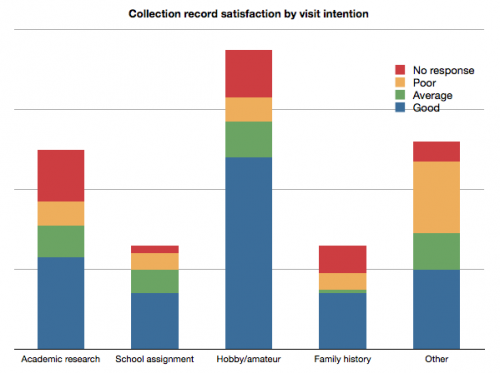
In order to survey only the SEEKERS we have set the survey to only show to visitors who’ve arrived via organic search, have visited at least three pages, and, obviously, are in the museum’s online collection. The survey, thus, has quite a limited reach and has been triggered by only 3900 visitors in the time – and has been completed by 229 respondents.

It is somewhat heartening to find that the largest subgroup of Seekers – those doing ‘amateur research, hobbyist and collectors’ – feel the content they find is ‘good’, and that the lowest positive ratings are for the ‘other’ group. This is especially interesting if we look by object and see which object records are being rated as ‘poor’. Here we find a mix of well documented (at least according to us) and very scantily documented (no image, metadata last copied from a paper stock book entry in the 1980s).

Once we get to a critical mass of respondents – 1000 or more – in this group we should have some more actionable findings. Then we move on to looking at the the other groupings.

Categories
General

Love Lace exhibition App v1.21 released with videos, social sharing and favourites

Late last week in time for the launch of the Janet Echelman work being suspended in the city as part of Art & About, the new version of the free Love Lace exhibition App went live in both the iTunes App Store and the Android Marketplace.

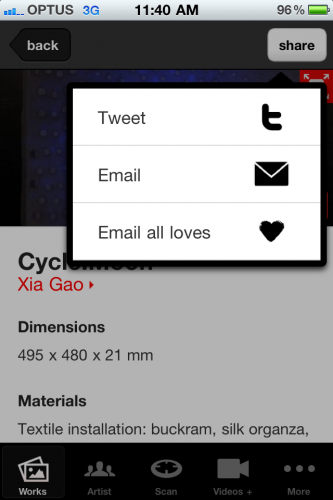
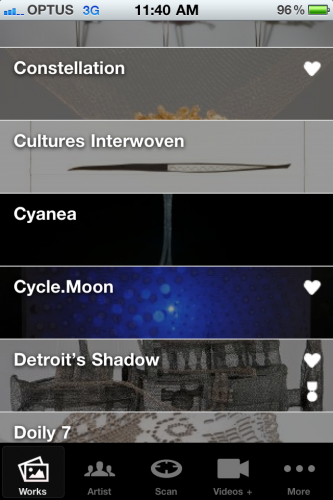
The new version now allows for favouriting of works, social sharing (including sharing of lists of favourites), and quick access to the behind the scenes videos.

We’re expecting that there will be one more point release this year to include the MoveME wifi tracking but beyond that the App will only receive bug fixes and minor tweaks.

Just to reiterate the importance of seeing museum Apps as ‘live products’ with an ongoing commitment to development and support, we’ve had to make several point releases since v1.0 on both Android and iOS. These changes have been a result of issues with user devices (almost entirely Android variations), and some user interface issues that have been revealed through looking at the Flurry Analytics and watching what people try to do with the App.

Download v1.21 for iOS or Android.

Watch the behind the scenes slideshow of the Janet Echelman installation.

Categories
API Collection databases Metadata open content Semantic Web

Things clever people do with your data #65535: Introducing ‘Free Your Metadata’

Last year Seth van Hooland at the Free University Brussels (ULB) approached us to look at how people used and navigated our online collection.

A few days ago Seth and his colleague Ruben Verborgh from the University Ghent launched Free Your Metadata – a demonstrator site for showing how even irregular metadata can have valued to others and how, if it is released rather than clutched tightly onto (until that mythical day when it is ‘perfect’), it can be cleaned up and improved using new software tools.

What’s awesome is that Seth & Ruben used the Powerhouse’s downloadable collection datafile as the test data for the project.

Here’s Seth and his team talking about the project.

F&N: What made the Powerhouse collection attractive for use as a data source?

Number one, it’s available for everyone and therefore our experiment can be repeated by others. Otherwise, the records are very representative for the sector.

F&N: Was the data dump more useful than the Collection API we have available?

This was purely due to the way Google Refine works: on large amounts of data at once. But also, it enables other views on the data, e.g., to work in a column-based way (to make clusters). We’re currently also working on a second paper which will explain the disadvantages of APIs.

F&N: What sort of problems did you find with our collection?

Sometimes really broad categories. Other inconveniences could be solved in the cleaning step (small textual variations, different units of measurement). All issues are explained in detail in the paper (which will be published shortly). But on the whole, the quality is really good.

F&N: Why do you think museums (and other organisations) have such difficulties doing simple things like making their metadata available? Is there a confusion between metadata and ‘images’ maybe?

There is a lot of confusion about what the best way is to make metadata available. One of the goals of the Free Your Metadata initiative, is to put forward best practices to do this. Institutions such as libraries and museums have a tradition to only publish information which is 100% complete and correct, which is more or less impossible in the case of metadata.

F&N: What sorts of things can now be done with this cleaned up metadata?

We plan to clean up, reconcile, and link several other collections to the Linked Data Cloud. That way, collections are no longer islands, but become part of the interlinked Web. This enables applications that cross the boundaries of a single collection. For example: browse the collection of one museum and find related objects in others.

F&N: How do we get the cleaned up metadata back into our collection management system?

We can export the result back as TSV (like the original result) and e-mail it. Then, you can match the records with your collection management system using records IDs.

—

Go and explore Free Your Metadata and play with Google Refine on your own ‘messy data’.

If you’re more nerdy you probably want to watch their ‘cleanup’ screencast where they process the Powerhouse dataset with Google Refine.

Categories
User behaviour Web metrics

Let’s Get Real report from Culture24 now available

Over in the UK right now Culture 24 are launching a report I worked on with them and many of the major cultural institutions in the UK. Coming from a need amongst web/digital people to find better ways of measuring the effectiveness of their work in the sector, the report – Let’s Get Real – pulls together analytics data from 3 years of activities online and in social media and makes a number of recommendations that are aimed at kickstarting, in the words of Culture24 Director, Jane Finnis, “a dramatic shift in the way we plan, invest and collaborate on the development of both the current and next generation digital cultural activities”.

The inability to effectively communicate the connection between delivering the institutional mission and digital projects is an ongoing concern to everyone working in museums. And at a time when there are increasing calls for museums to take roles that are more akin to broadcasters and publishers in the digital space, yet the majority of internal and external stakeholder value is still perceived as coming from visits to exhibitions and buildings, there is a pressing need to keep thinking about the ways digital projects report success (or otherwise!).

From my perspective, working with this diverse group of institutions was a lot of fun and very illuminating. It helped consolidate much of my thinking about the state of digital projects in the cultural sector and the long road ahead to really transform the way, particularly museums (less so the performing arts), use and adequately resource digital in their institutions. At the same time there were many unexpected surprises – the very different geographies of online visitors between institutions, and the comparatively low impact of social media in terms of website traffic, even for particularly well-promoted campaigns were revealing. The social media work by Rachel Clements also demonstrated that the easy option – reporting the numbers – greatly undersells the value of social media. The alternative, qualitative analysis, is much harder and requires more time and an understanding of why you are active in social media in the first place.

Have a read of the report (PDF) and see what you think.

For those involved in the project there was a lot more than number crunching – there were some amazingly productive working sessions and meetups – and the launch conference that is taking place right now in Bristol (check the #C24LGR hastag conversations!). In many ways the report captures only a fragment of the ‘value’ of the project as a whole.

Categories
Mobile User behaviour User experience

More on mobile tech impacts in museums (extended Mashable remix)

There’s a nice introductory piece today that features some of the recent Powerhouse Museum work in Mashable. It is a broad overview piece of how the Smithsonian, the NY Museum of Jewish Heritage and the Powerhouse have been utilising mobile technologies in galleries and exhibitions.

Reading some of the comments and picking up on some of the chatter on Twitter I thought it might be valuable to include two of the Q&A from the journalist that didn’t make the cut in the final story. They add a little more context and introduce more complexity into the issue – probably less interesting for non-museum people but useful to those deeply engaged in the field.

Q – How are you measuring the effectiveness of the technology you’ve deployed? Downloads? Data capture? Usage stats? I noticed you are going to put in moveME wifi triangulation system. What will the data from this tell you – you had mentioned in a post dwell time and loves but how will you put those findings to use? (Why are you doing this?)

We’re really interested in changing the physical design of our galleries so that they are able to deliver better experiences and tell more effective stories to and with our visitors. Once a visitor carries a fully searchable encyclopedia in their pocket (not too mention access to all our collection including the objects not on display), the whole idea of a ‘museum’ and how it could and should be designed, changes.

The ‘effectiveness’ of technologies has a number of different facets –

1. We look at raw usage data – downloads, views, interactions in order to redesign and iterate new versions of the technology itself.

2. Then we look at how visitors are using it both individually as as groups through observation and also data collection. This helps us to think about the social impact of our technologies in the galleries. For example, are our mobile apps meaning that families visiting together are talking to each other less than before? (a possibly negative outcome!)

3. We also look at the aggregate usage data to help us think about what content is being accessed (and what is being ignored) and then follow up with qualitative research to understand why. This, over time, helps us better understand which objects, for example, visitors are interested in finding out more about, and which, perhaps need a little more prompting.

4. Finally, and holistically, we aim to bring all this data together to better inform the spatial layout of galleries, and also the ancillary services such as education kits for teachers or curator-guided tours, that might further enhance a visit.

As we move from 1 to 4 the impact and time taken gets longer and longer obviously – and impacts much more broadly on the museum and its various operations.

Q – Where do you think things are going in terms of digital tech in your museum and in museums in general?

At the Powerhouse we are certainly getting far more strategic in our deployments rather than being seduced by novelty. This has been largely possibly because of the way digital has evolved at the museum with significant internal capacity and on-staff developers, digital producers, and strategy.

Broadly in the museum world we are seeing much higher volumes of technologies deployed – Google Goggles at the Getty, NFC at the Museum of London, AR at the Stedelijk, touch-tables everywhere – and I expect that over the next decade we will see the very idea of a ‘digital team’ or ‘digital unit’ or even ‘CTO’ at a museum as quaint. Simply because the very definition of a museum will be, itself, ‘digital’ and cross-platform.

Categories
Arduino Visualisation

Carlos & Nico discuss the making of Facetweetbox with Lego & Arduino

One of the pleasures of working with the teams that I do at the Powerhouse is that even in the busiest part of the year they manage to find time to experiment and turn up something quirky. Sometimes these quirky experiments even go on to become the foundation stones of future projects.

Most recently, during a hectic July when festival microsites, major exhibition microsites, and mobile apps were all running as parallel live projects, Carlos and Nico started building something with Lego.

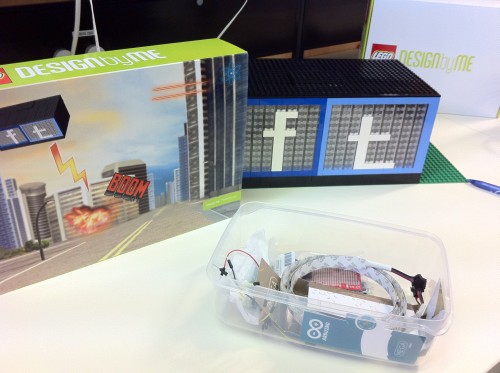
It became the Facetweetbox.

I asked Nico and Carlos about this and its genesis.

F&N: What is the main idea behind building Facetweetbox?

Nico: I sit right next to this ‘ideas and implementation factory’ called Carlos. One day he rode his digital pony into the office and showed me a project by Matt Reed from Red Pepper.

Immediately we started talking about doing something in a similar vein ourselves.

It seemed to be a fun little side project that would help us encourage other staff and visitors to engaging on social media channels we are active in.

Let me explain.

As you know, the Powerhouse Museum is a very active cultural institution, both in physical and virtual form. We do more than store and sometimes display great collections. We are always pushing to build stories and help others build stories around objects and shared ideas. Exchanges of ideas and information happen in many places, from dry repositories like the Museum Metadata Exchange to lively posts on a festival’s Facebook page. I believe we have has a responsibility to encourage even informal conversation towards educative and creative exchange.

The museum is very lucky in that we tend to naturally pick up a lot of social media chatter. I think this is in large part due to operating as a fairly well respected cultural institution that actually does lots of festivals, events, talks and exhibitions. The challenge for our team is to make visitors aware of these exchange and then encourage them to explore these spaces. The other challenge is to push our staff to engage with these channels. Without both social media becomes either unguided or just ‘PR shouty’.

So Facetweetbox was seen as a fun way to encourage both visitors and staff alike.

When you’re at a conference or event and there’s a stream of tweets displayed on a screen, I often think it is great to be reminded of that channel but it feels out of place to have Twitter of Facebook broadcast like that. Sure, twitter is public message exchange but placing it outside of my hand and on a TV screen misses the implicit joy and satisfaction of information exchanges and the playfulness of backchannel communication. Facetweetbox shows you that something is going on but not what that actually is. The contents of a tweet is not expressed so it is a great little call to action playing on the human instinct to want to know what is being said, by whom and why.

Finally, from a actual construction point of view it was really all about fun. I mean, who does not want to play/work with Lego.

I had really hoped to debut this bit of kit at the Sydney Design 2011 but with delays in the delivery of some parts it did not happen.

CARLOS: It was really simple.

Facetweetbox is an extension of the type of projects I do for enjoyment outside of work at the Museum. I’ve always sought to move the digital space from the virtual to the ‘real world’ – to generate physical reactions. To surprise people. For example, to ‘blow out a candle via the Internet’. That was a project I did a year ago.

And, given the high intensity of that period in the office, the main idea was to have fun and challenge Nico a bit.

Q: How did you custom design the Lego? Are there any Lego bits you wished you could have added?

NICO: I started by sketching it out and using the Lego Designer to play around with some designs, from complex to simple shapes. In the end it really came down to function and cost winning over aesthetics. Don’t get me wrong, I’m really happy with the end product, but certainly was the more conservative of the designs. In the end I wanted something that was;
– robust, hence the sometimes over engineered interlacing of the bricks.
– reusable, hence the dual box configuration with transparent bricks front. If a new player or a logo change happens we should be able to create it using generic white bricks.
– compartmentalized, hence separate spacing for the power units, controllers and the LED light areas.
– accessible, hence the use of a easy to access area for the power unit (battery or power supply) and control units.


In the end the physical build you see today is a stripped down version to some degree, mainly for the cost reasons listed about. Lego Control Computers and step ladders are there so the Minfigs can access the unit via the back door to keep everything going.

Q: What Arduino components are used? How do they work? Are there any Arduino components that you wished existed that don’t?

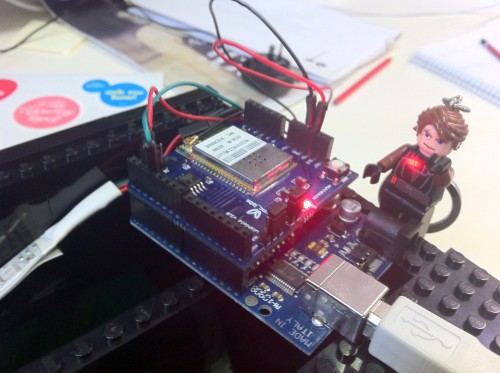
CARLOS: The following components where used;
– Arduino Decimillia (temporarily)
– Arduino jumper cables
– WiShield 2.0
– 32 LED RGB strip addressable
– 9 Volts adaptor 1000 milliAmps

There is also a server component to this setup. We have a (virtualised) Linux box running a Django site that queries Facebook and Twitter with the given values. For Twitter it can be set to any string, and for Facebook is can be any link that is associated with a Like button.

In the future I would like to see this extended to comments.

The services are queried every 30 seconds by the Lego people inside the box and then the they receive a simple string format response that instructs them to flick the switches inside the box to flash in a particualr way – duration, repetition, location and colour.

I would like to enable the device to run of mains power as well as lipo batteries to ensure lasting performance and portability. Oh, and sound effects (*pew*pew*pew*)!

I’d also like to start to look at sentiment analysis and translate that into a colour scheme and/or pattern. In the case of Twitter, I want to map particular strings to colours and/or patterns.

You could also target the installations of LEDs within gallery spaces to react to particular strings. For example if you are in a Lace exhibition and someone takes a photo and tweets it with hashtag #lovelace a particular visual or sonic reference could be triggered in the exhibition space.

Categories
Mobile QR codes User behaviour

Early App and QR code scanning data from Love Lace exhibition

I promised updates on the data coming from the QR code implementation in the Love Lace exhibition so here are the results of the last 4 weeks since opening.

Already we’ve released updates to both the iOS and Android versions of the Love Lace App. Perhaps surprisingly it has been the Android App that has given us the most trouble. Carlos has been troubleshooting various Android devices and OS versions to make the QR code scanning work properly – something that has been made much easier on iOS because of the consistency of hardware and lockdown of other apps. Now, though both are humming along nicely.

In terms of downloads we’ve had 572 iOS and 165 Androids. And using Flurry we’ve tracked 3,126 sessions on iOS and 502 on Android.

But let’s jump to the meaty data.

When we designed this App the QR code scanning tool was built in to try to maximise the use of QR code scans in the exhibition. Of course users could still just browse the scrolling list of objects and artists if they wished, but we hoped to get the QR scanning up to a reasonably good level by reducing user friction.

Looking only at the iOS figures we can see that browsing is by far the preferred behaviour although we haven’t segmented this by location. Obviously the QR code scanning only works when the visitor is in the gallery and outside of the gallery any App use would involve the scrolling browser only.

233 items (objects and artist records) have been viewed a total of 6933 times using the scrolling interface.

The QR code scanner has had 844 scans including 45 failed scans and 17 non-exhibition codes. Many objects have not been scanned at all.

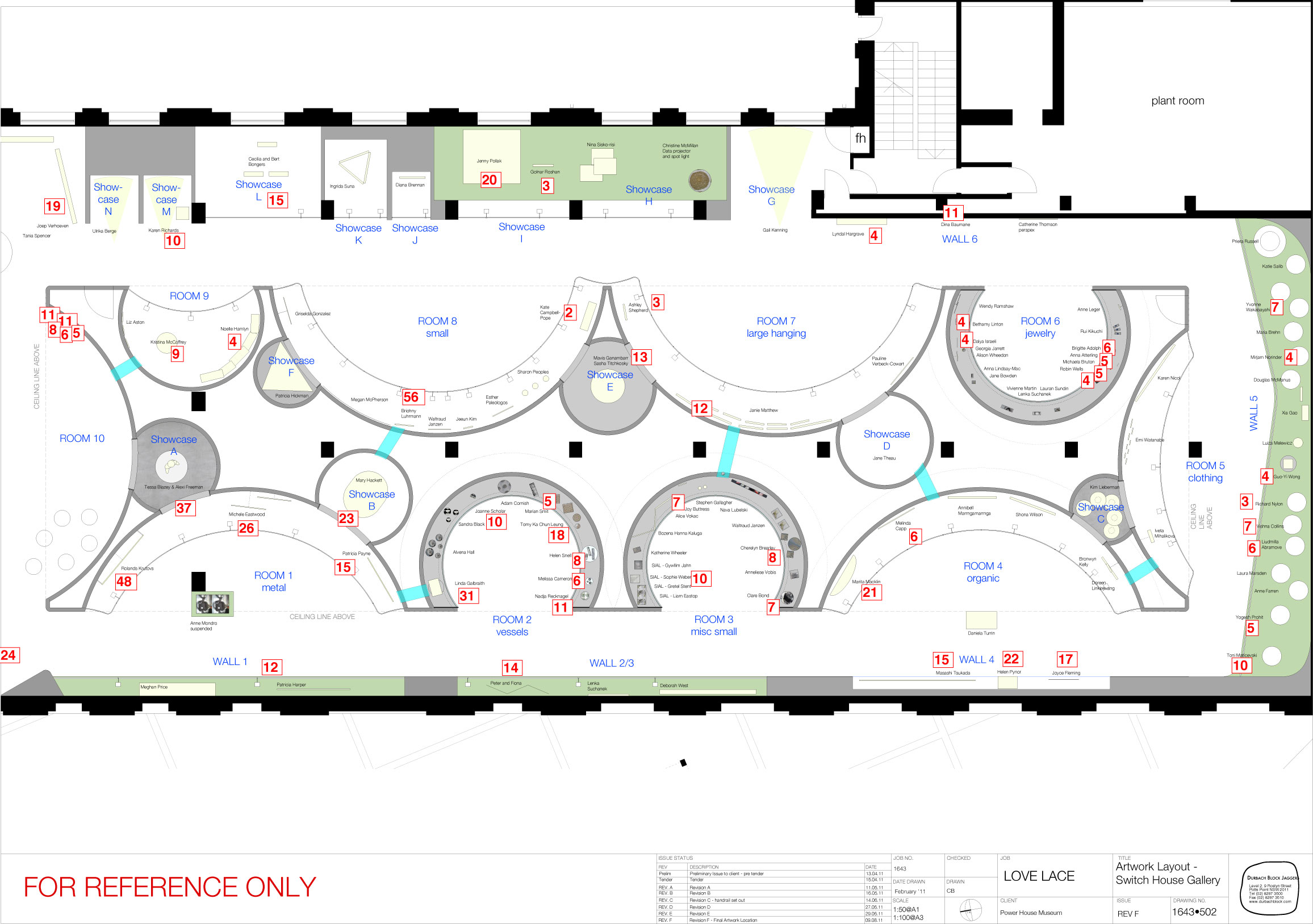
Where this becomes interesting at this early stage is when we overlay the scans on the exhibition floor plan.


(click to open this at full size in a new window/tab – 457kb)

Visitors enter this gallery space from the bottom left and then complete a circuit counter clockwise. The triangular grey area in the very bottom left is the exhibition title wall that has signed promoting the App and the free in-gallery wifi.

Not unexpectedly the first hemisphere of Room 1 followed by Room 2 attract the most scans. However after that things become interesting.

What is striking about the overlay is that the most popular object (Meghan Price’s Habitat Wave) is near the end of the circuit of this part of the gallery in Room 8 and this is a rare outlier, being surrounded by almost entirely unscanned objects. Similarly Room 6, full of smaller objects, has a cluster of scanned objects but these are comparatively low numbers.

The cluster at the top of Room 10 are a set of five QR codes linking to the Inter Lace microdoumentaries that are projected in a remixed form in this space. Visitors dwell for significant time in this area but from the low figures would not seem to be aware of the full versions of these documentaries that lie in wait on YouTube.

Next?

In the next few weeks we will be rolling out a newer version of the App which will incorporate both these documentary videos as well as the ability to ‘love’ objects and share them more easily. We will be able to compare this data with the scan and view data and see if there are any correlations. Then, in about six weeks time the moveME wifi triangulation system will also be integrated allowing us to overlay and correlate dwell times in the space against ‘actions’ such as ‘love’ or scanning.

Stay tuned for the results of that.

Categories
Developer tools Interactive Media Interviews Mobile User experience

Interview with Rob Manson on Layar, streetARt and the AR Dev Camp

A little while back at the beginning of June we hosted the Sydney AR Dev Camp. Organised by Rob Manson and Alex Young, the AR Dev Camp was aimed at exposing local Sydney developers to some of the recent developments in augmented reality. A free event sponsored by Layar and the Powerhouse, it filled the Thinkspace Lab on a Saturday to network and ‘make stuff’. Rob and Alex also launched their new buildAR toolkit for content producers to quickly make and publish mobile AR projects using an online interface.

AR Dev Camp Sydney
(AR Dev Camp Sydney by Halans)

AR Dev Camp generated many discussions.

Some of these are covered and expanded on by Suse Cairns and Luke Hesphanol.

The ARTours developed by the Stedelijk Museum and presented as incursions into other spaces – including a rumoured temporary rogue deployment at Tate Modern – really demonstrate the way that AR popularises some interesting conceptual arenas. Indeed, just walking down Harris St that morning, booting up Layar and seeing a giant Lego man hovering over the Powerhouse was something that you’d rarely see. Margriet Schavemaker, Hein Wils, Paul Stork and Ebelien Pondaag’s paper from Museums and the Web 2011 this year explores these in detail.

—

I spoke to Rob Manson in March, as the event was being planned, about some of the changes in AR.

F&N: A lot has changed in both AR and Layar since we last spoke, way back when MOB released the PHM images in a Layar in 2009. Can you tell me about some of the changes to the Layar platform and other AR apps as you’ve seen them mature?

RM: I can’t believe how quickly that time has passed! But in a lot of ways we haven’t even started and the path in front of us is starting to get a lot clearer now.

Layar has continued with their main strength which is massive adoption (and those figures are just for Android!). It’s now the most dominant platform in the whole AR landscape. And just this week they announced Layar Vision, their natural feature tracking solution. Layar has become the default AR app that everyone refers to.

With this new version 6 of Layar you can now add image based markers, animation, higher resolution images and a much simpler improved user experience. And of course it supports a lot more interactivity than it did way back when we created the first Powerhouse layer – it now includes layer actions and proximity triggers. Our buildAR platform makes it easy for you to customise all of these settings and we’ve already announced full support for the new Layar Vision features.

Despite being an early adoption, the Powerhouse layer was loaded 2384 times by 853 unique users in 13 countries in just under 18 months. Whilst that may not sound like a lot, we’ve also had heavily promoted layers run by advertising agencies for major brands that did almost exactly the same numbers as the PHM layer. So on the whole I think the PHM layer has performed pretty well. Especially considering it was created quite early on and there’s not really a lot of reasons for people to return to the layer or share it with their friends.

Now Layar have also released the Layar Player SDK which allows us to embed the Layar browser within our own iPhone applications. This has opened up a world of new opportunities and means we can wrap layers in even richer interactivity and allow users to create and share media like photos, audio and videos. This is what led us to create http://streetARtAPP.com

F&N:Obviously your StreetARt App is indicative of some these new changes – the ability to separate off as an App in its own right and have interactions.

Yes, we’ve created an App framework around the Layar Player SDK that integrates with our buildAR platform.

The response has been great. We’ve done very little if any promotion except for twitter, a blog post and being promoted as a featured layer and in our first month we’ve attracted over 25,000 unique users from 166 countries. Our total count is now well over 200,000 unique users from over 194 countries.

We’ve engaged with street art and graf communities through twitter and the response has been really good. We’re really outsiders that just enjoy the art and really wanted an easier way to find it ourselves. The artists that have used it have given us really positive feedback and seem happy to spread the love.

F&N: What happens to the aggregated dataset of geolocated works?

This is part of our new features road map. The first phase of social sharing with multi-device permalinks has been released. We’re now working on ways for people to import/manage photo sets from Flickr and to be able to map out and share their own sub-sets of the streetARt locations to create walking tours, etc.

Plus we want to focus on specific artists works, publish interviews and bubble up more dynamic content to the make the whole platform feel more alive.

F&N: How do you see it complimenting non-AR graf apps like All City and others?

There’s quite a few actually. There’s Allcity which was sponsored by Adidas. Streetartview.com which was sponsored by Red Bull and most recently Bomb It which is an app based on or supporting a movie. And also the Street Art paid iPhone App.

We think there’s plenty of room for all of these apps I’m sure there will be a lot more soon too. However, I think there’s a bit of a backlash building around the sponsored apps as some people in the scene see this as just an exploitation of the graf/streetart community.

We considered this a lot when we built streetARt. In some ways people could point the same finger at us but we don’t charge for the App and we don’t sell sugary drinks or expensive sports clothes/shoes. We just want to find out what happens when you mix cool content with cool technology and so we hope people see our good intentions.

And of course we were the first to do it with AR!

F&N: One thing I’ve been finding challenging with AR, despite all the talk of ‘virtual and physical worlds merging’, is that the public awareness of the data cloud that surrounds everything now is still very low. I’d be interested on your thoughts as to how to make people aware that AR content exists out in the world at large.

I think that’s a critical point. Recently some artists published what they called the ARt Manifesto but David Murphy posted a really valid critique.

There IS an interesting debate to be had around “control” of the digital layers and where they can be overlaid onto the physical world. But the digital layer is an abundant, effectively infinite resource where the cost to create is continually dropping. The really scarce resource that we should all really be focused upon is “attention”.

Getting people’s attention, keeping it and then getting them to engage on an ongoing basis is the real challenge. That’s why we’re so happy with the results that streetARt has created too. Not only have we attracted tens of thousands of users from all around the world, we’ve also been able to attract hundreds of really engaged users that return on a regular basis, many of them almost daily. The key to this was populating streetARt with enough Creative Commons-licensed content to kickstart it. This made sure that most people would see some cool art right from their first experience. In locative media [getting the first experience right] can be a real challenge – so we started with over 30,000 images from over 520 regions around the world, and now the users are helping us grow that further. But the 90/9/1 [participation] ratio is a reality and you have to plan for it.

Categories
AV Related Mobile QR codes User experience

Love Lace App instructional video

One of the biggest hurdles for in-gallery App take up – actually any in-gallery technology take up – is awareness. So when you’ve just released an App (read the full story), a cross-platform one at that, for a new exhibition (opening July 30), then it really helps to have some very obvious visual promotion of it.

Here’s our instructional video put together by Estee Wah and Leonie Jones. (No questions about where we found the enormous iPhone please! Or the hand model!)

If you’ve only visited the Love Lace website on your computer you might want to try it on your iPhone too . . .

[Android version of the App is on the Android market now]